Google

Google's Fuchsia OS Confirmed To Have Android App Support Via Android Runtime (9to5google.com) 61

An anonymous reader quotes a report from 9to5Google: We've long suspected that Google's upcoming operating system, Fuchsia, would join the ranks of Chrome OS (and Android) in its support for Android apps. Today, that suspicion has been confirmed by a new change found in the Android Open Source Project, and we can say with confidence that Fuchsia will be capable of running Android apps using the Android Runtime. To make it simple, Fuchsia will use a specially designed version of the Android Runtime ("ART" above) to run Android applications. This version of ART will be installable on any Fuchsia device using a .far file, Fuchsia's equivalent of Android's APK.

How exactly Fuchsia will use the Android Runtime from there is still unclear. This is includes whether the Android Runtime is able to work as expected to replace Linux kernel calls with equivalents from Fuchsia's Zircon kernel or if ART will run inside of a Linux virtual machine using Machina, Fuchsia's virtual machine system. Regardless, what is clear is that Fuchsia devices are intended to run Android applications.

Google

Chrome on Windows 10 To Get Dark Mode Feature Soon (hothardware.com) 66

Last year, Google pushed 'dark mode', a feature that replaces the shiny, whitespace background on a web page with a dark color, to its Android operating system and YouTube service. The company is now working to expand the feature to Chrome's Windows 10 application. Peter Kasting, a Chrome developer, confirmed the move in response to a user's query on a Reddit thread. He said a "native dark mode support is in progress" for Chrome's desktop application. Until then, reminded Kasting, "we generally suggest people use a dark theme" for Chrome via a third-party extension.
Bug

Google is Working on a Fix For Laggy Tablet Mode on Chrome OS Devices (9to5google.com) 41

An anonymous reader shares a report: Chrome OS was originally a laptop platform, but slowly it's being reworked for tablet form factors. However, as that goes on, there have been some hiccups. Most recently, many have noted the poor performance of tablet mode especially on Chrome OS products like the Pixel Slate, but it seems a fix for that lag is incoming. If you tuned into any hands-on or review coverage of Google's Pixel Slate, you're likely familiar with the performance issues many have described. In tablet mode, Chrome OS has a lot of issues with lag. This is especially evident in the multitasking screen, and it seems that is the first thing Google is looking at to fix these problems. ChromeUnboxed notes a recent bug tracker which reveals how Google plans to start fixing Chrome OS tablet mode lag in the multitasking screen. Somewhat hilariously, it seems a big reason for the poor frame rates in the animations on this screen actually comes down to how the OS renders the rounded corners on this screen.
Chrome

Microsoft Says Edge is Still More Power Efficient than Chrome and Firefox (neowin.net) 90

An anonymous reader quotes Neowin: Every time Microsoft releases a Windows 10 feature update, it runs some efficiency tests to prove that its Edge browser is significantly faster than the competition, which includes Mozilla Firefox and Google Chrome. Then the company posts the detailed results on its Windows blog and YouTube channel, boasting about the power efficiency of its browser. Even though the company still has run battery tests, it has remained strangely silent about them, posting about it on GitHub only. While many thought that Microsoft's silence on the matter was due to Edge finally losing to the competition, it appears that this is not the case.

As spotted by Paul Thurrott, Microsoft has indeed run efficiency tests for Edge in Windows 10 version 1809, pitting it against the likes of Firefox and Chrome. Through these tests, the company has concluded that Edge lasts 24% longer than Chrome and a massive 94% longer than Firefox on average.

"While Edge appears to have won these efficiency tests easily as well, it is likely that the company did not decide to promote this achievement -- as it has always done previously -- because of the planned abandonment of EdgeHTML in favor of Chromium," the article concludes.

"It will be very interesting to see if Microsoft Edge is able to maintain its battery advantage once the switch to Chromium is complete."
Chrome

Google Chrome's New UI is Ugly, And People Are Very Angry (zdnet.com) 294

Catalin Cimpanu, writing for ZDNet: Every major user interface (UI) redesign project is a hit and miss game, and Google's new Chrome UI appears to be a colossal miss. Designed with mobile devices in mind, the new Chrome user interface style was officially rolled out in September this year, with the release of Chrome version 69. Not all users liked the new UI, and this was clear from the beginning, with some users voicing their discontent online even back then. However, those users who didn't appreciate the new lighter-toned Chrome interface had the option to visit the chrome://flags page and modify a Chrome setting and continue using Chrome's older UI.

But with Chrome version 71, released earlier this month, Google has removed the Chrome flag that allowed users to use the old UI. As you might imagine, this change did not go well, at all. Chrome's new UI might have been developed with a mobile-first approach in mind, but the UI is problematic on laptops and desktops, where its lighter tone and rounded tabs make it extremely hard to distinguish tabs from one another, especially when users open multiple tabs. Since being able to distinguish and switch between tabs at a fast pace is an important detail in most of today's internet-based jobs, many users have been having trouble adapting to the new UI both at work and at home, especially if they're the kind of people who deal with tens of tabs at the same time.

Google

Chrome OS To Block USB Access While the Screen is Locked (zdnet.com) 91

Google will add a new security feature to Chrome OS, the company's web-based operating system that powers its Chromebooks devices, it announced this week. From a report: The new feature, named USBGuard, will block access to the USB port access while the device's screen is locked. According to a Chrome OS source code commit spotted by Chrome Story earlier this week, the new feature is currently available in Chrome OS Canary builds and is expected to land in the stable branch of Chrome OS soon. Once this happens, users can enable it by modifying the following Chrome OS flag: chrome://flags/#enable-usbguard . The way this security feature is meant to work is by preventing the operating system from reading or executing any code when a USB-based device is plugged in, and the screen is locked.
Chrome

Google Working on Blocking Back Button Hijacking in Chrome (zdnet.com) 152

Google engineers are currently working on a Chrome browser update that will block malicious websites from hijacking the browser's history and, indirectly, the Back button. From a report: The issue at hand is a well-known tactic often seen employed by many shady sites across the Internet. A user would visit a website, then he'd accidentally click or tap on an ad, and be taken to a new page. But when the user presses the Back button to go back to the previous page, the browser just reloads the same page over and over again, keeping the user trapped on the ad page. [...] Recent source code updates to the Chromium project, the open-source browser engine behind the Chrome browser, reveal that Google engineers are planning to crack down on this type of abusive behavior. These code updates will allow Chrome to detect when browser history entries have been generated by user interaction, or by an automated method.
Businesses

'Google Isn't the Company That We Should Have Handed the Web Over To' (arstechnica.com) 331

A reader shares a report from Ars Technica's Peter Bright: With Microsoft's decision to end development of its own Web rendering engine and switch to Chromium, control over the Web has functionally been ceded to Google. That's a worrying turn of events, given the company's past behavior. Chrome itself has about 72 percent of the desktop-browser market share. Edge has about 4 percent. Opera, based on Chromium, has another 2 percent. The abandoned, no-longer-updated Internet Explorer has 5 percent, and Safari -- only available on macOS -- about 5 percent. When Microsoft's transition is complete, we're looking at a world where Chrome and Chrome-derivatives take about 80 percent of the market, with only Firefox, at 9 percent, actively maintained and available cross-platform.

The mobile story has stronger representation from Safari, thanks to the iPhone, but overall tells a similar story. Chrome has 53 percent directly, plus another 6 percent from Samsung Internet, another 5 percent from Opera, and another 2 percent from Android browser. Safari has about 22 percent, with the Chinese UC Browser sitting at about 9 percent. That's two-thirds of the mobile market going to Chrome and Chrome derivatives. In terms of raw percentages, Google won't have quite as big a lock on the browser space as Microsoft did with Internet Explorer -- Internet Explorer 6 peaked at around 80 percent, and all versions of Internet Explorer together may have reached as high as 95 percent. But Google's reach is, in practice, much greater: not only is the Web a substantially more important place today than it was in the early 2000s, but also there's a whole new mobile Web that operates in addition to the desktop Web.
Google has deployed proprietary technology and left the rest of the industry playing catch-up, writes Peter. The company has "tried to push the Web into a Google-controlled proprietary direction to improve the performance of Google's online services when used in conjunction with Google's browser, consolidating Google's market positioning and putting everyone else at a disadvantage."

YouTube has been a particular source of problems. One example Peter provides has to do with a hidden, empty HTML element that was added to each YouTube video to disable Edge's hardware accelerated video decoding: "For no obvious reason, Google changed YouTube to add a hidden, empty HTML element that overlaid each video. This element disabled Edge's fastest, most efficient hardware accelerated video decoding. It hurt Edge's battery-life performance and took it below Chrome's. The change didn't improve Chrome's performance and didn't appear to serve any real purpose; it just hurt Edge, allowing Google to claim that Chrome's battery life was actually superior to Edge's. Microsoft asked Google if the company could remove the element, to no avail."
Chromium

Former Edge Browser Intern Alleges Google Sabotaged Microsoft's Browser (ycombinator.com) 427

Joshua Bakita, a former software engineering intern on the Edge team at Microsoft, says one of the reasons why Microsoft had to ditch EdgeHTML rendering engine in Edge browser and switch to Chromium was to keep up with the changes (some of which were notorious) that Google pushed to its sites. These changes were designed to ensure that Edge and other browsers could not properly run Google's sites, he alleged. Responding to a comment, he wrote: "For example, they may start integrating technologies for which they have exclusive, or at least 'special' access. Can you imagine if all of a sudden Google apps start performing better than anyone else's?" This is already happening. I very recently worked on the Edge team, and one of the reasons we decided to end EdgeHTML was because Google kept making changes to its sites that broke other browsers, and we couldn't keep up.

For example, they recently added a hidden empty div over YouTube videos that causes our hardware acceleration fast-path to bail (should now be fixed in Win10 Oct update). Prior to that, our fairly state-of-the-art video acceleration put us well ahead of Chrome on video playback time on battery, but almost the instant they broke things on YouTube, they started advertising Chrome's dominance over Edge on video-watching battery life. What makes it so sad, is that their claimed dominance was not due to ingenious optimization work by Chrome, but due to a failure of YouTube. On the whole, they only made the web slower.

Now while I'm not sure I'm convinced that YouTube was changed intentionally to slow Edge, many of my co-workers are quite convinced -- and they're the ones who looked into it personally. To add to this all, when we asked, YouTube turned down our request to remove the hidden empty div and did not elaborate further. And this is only one case.

Firefox

New Firefox Suggests Ways To Get More Out of the Web (cnet.com) 199

Starting Tuesday, Firefox will nudge you to try out options designed to make the web more interesting, more useful or more productive. From a report: Mozilla's new Firefox 64 keeps an eye on what you're up to and prompts you to try extensions and features that could help you with that activity, the browser maker said. For example, if you open the same tab lots of times, it could suggest you pin it to your tab strip for easier future access. Other suggestions include installing the Facebook Container extension to curtail the social network's snooping, a Google Translate extension to tap into Google's service, and the Enhancer for YouTube extension to do things like block ads and control playback on Google's video site.

The feature could help you customize Firefox more to your liking -- something that could help you stick with the browser in the face of Google Chrome's dominance. And that, in turn, could help Mozilla pursue its push toward a privacy-respecting web that's not just effectively controlled by Chrome.

Chromium

Electron and the Decline of Native Apps (daringfireball.net) 328

SwiftOnSecurity, regarding Microsoft's switch to Chromium as Windows's built-in rendering engine: This isn't about Chrome. This is about ElectronJS. Microsoft thinks EdgeHTML cannot get to drop-in feature-parity with Chromium to replace it in Electron apps, whose duplication is becoming a significant performance drain. They want to single-instance Electron with their own fork. Electron is a cancer murdering both macOS and Windows as it proliferates. Microsoft must offer a drop-in version with native optimizations to improve performance and resource utilization. This is the end of desktop applications. There's nowhere but JavaScript. John Gruber of DaringFireball: I don't share the depth of their pessimism regarding native apps, but Electron is without question a scourge. I think the Mac will prove more resilient than Windows, because the Mac is the platform that attracts people who care. But I worry. In some ways, the worst thing that ever happened to the Mac is that it got so much more popular a decade ago. In theory, that should have been nothing but good news for the platform -- more users means more attention from developers. The more Mac users there are, the more Mac apps we should see.

The problem is, the users who really care about good native apps -- users who know HIG violations when they see them, who care about performance, who care about Mac apps being right -- were mostly already on the Mac. A lot of newer Mac users either don't know or don't care about what makes for a good Mac app.

Chromium

Google, Mozilla, and Opera React To Microsoft's Embrace of Chromium (venturebeat.com) 186

With the news earlier today that Microsoft is embracing Chromium for Edge browser development on the desktop, VentureBeat decided to see what the other browser companies had to say about the decision. From the report: Google largely sees Microsoft's decision as a good thing, which is not exactly a surprise given that the company created the Chromium open source project. "Chrome has been a champion of the open web since inception and we welcome Microsoft to the community of Chromium contributors. We look forward to working with Microsoft and the web standards community to advance the open web, support user choice, and deliver great browsing experiences."

Mozilla meanwhile sees Microsoft's move as further validation that users should switch to Firefox. "This just increases the importance of Mozilla's role as the only independent choice. We are not going to concede that Google's implementation of the web is the only option consumers should have. That's why we built Firefox in the first place and why we will always fight for a truly open web." Mozilla regularly points out it develops the only independent browser -- meaning it's not tied to a tech company that has priorities which often don't align with the web. Apple (Safari), Google (Chrome), and Microsoft (Edge) all have their own corporate interests.

Opera thinks Microsoft is making a smart move, because it did the same thing six years ago. "We noticed that Microsoft seems very much to be following in Opera's footsteps. Switching to Chromium is part of a strategy Opera successfully adopted in 2012. This strategy has proved fruitful for Opera, allowing us to focus on bringing unique features to our products. As for the impact on the Chromium ecosystem, we are yet to see how it will turn out, but we hope this will be a positive move for the future of the web."

Chrome

Microsoft Is Embracing Chromium, Bringing Edge To Windows 7, Windows 8, and Mac 139

An anonymous reader writes: Microsoft today embraced Google's Chromium open source project for Edge development on the desktop. The company also announced Edge is coming to all supported versions of Windows and to macOS. Microsoft wants to make some big changes, which it says will happen "over the next year or so." The first preview builds of the Chromium-powered Edge will arrive in early 2019, according to Microsoft.

And yes, this means Chrome extension support.
Android

Google Is Shutting Down Its Allo Messaging App, Says Report (9to5google.com) 62

According to 9to5Google, citing a source familiar with the plan, Google will "soon" announce that it will be shutting down its Google Allo messaging app. "This development comes almost 8 months after Anil Sabharwal, Vice President of Chrome, Comms and Photos at Google, said that the company was 'pausing investment' in Google Allo," reports 9to5Google. It also comes less than a week after 9to5Google reported that Google will be shutting down Google Hangouts for consumers sometime in 2020. Google may delay the news about Allo due to the backlash stemming from the article about Hangouts. From the report: Lately, some of the app's remaining users have complained of bugs and broken functionality: there have been messages not being delivered, features like hearting posts randomly disappearing for some, and the latest stable version has been unable to perform Google Drive restores of chats for several weeks. Meanwhile, essentially the entire Allo team was moved to work on Android Messages and spent the last several months porting over much of Allo's features and functionality -- all leading up to the recent beginnings of evidence that the rollout of Google's RCS 'Chat' initiative is gaining traction.
Chrome

Cyber-Espionage Group Uses Chrome Extension To Infect Victims (zdnet.com) 25

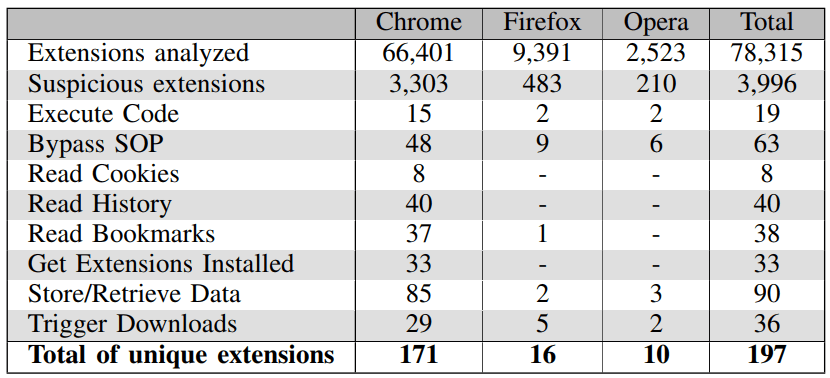
In what appears to be a first on the cyber-espionage scene, a nation-state-backed hacking group has used a Google Chrome extension to infect victims and steal passwords and cookies from their browsers. From a report: This is the first time an APT (Advanced Persistent Threat -- an industry term for nation-state hacking groups) has been seen (ab)using a Chrome extension, albeit it's not the first time one has used a browser extension, as the Russian-linked Turla APT previously used a Firefox add-on in 2015. According to a report that's going to be published later today by the ASERT team at Netscout reveals the details of a spear-phishing campaign that's been pushing a malicious Chrome extension since at least May 2018.

Hackers used spear-phishing emails to lure victims on websites copied from legitimate academic organizations. These phishing sites, now down, showed a benign PDF document but prevented users from viewing it, redirecting victims to the official Chrome Web Store page to install a (now removed) Chrome extension named Auto Font Manager.

Chromium

Microsoft is Building a Chromium-powered Web Browser That Will Replace Edge on Windows 10: Report (windowscentral.com) 377

Microsoft is throwing in the towel with Edge and is building a new web browser for Windows 10, this time powered by Chromium, news blog Windows Central reported Monday. From the report: Microsoft's Edge web browser has seen little success since its debut on Windows 10 back in 2015. Built from the ground up with a new rendering engine known as EdgeHTML, Microsoft Edge was designed to be fast, lightweight, and secure, but launched with a plethora of issues which resulted in users rejecting it early on. Edge has since struggled to gain any traction, thanks to its continued instability and lack of mindshare, from users and web developers.

Because of this, I'm told that Microsoft is throwing in the towel with EdgeHTML and is instead building a new web browser powered by Chromium, a rendering engine first popularized by Google's Chrome browser. Codenamed Anaheim, this new web browser for Windows 10 will replace Edge as the default browser on the platform. It's unknown at this time if Anaheim will use the Edge brand or a new brand, or if the user interface between Edge and Anaheim is different. One thing is for sure, however; EdgeHTML in Windows 10's default browser is dead.

Communications

Amazon May Be Hiding Its Plans To Test New Wireless Tech By Masquerading as a Massage Spa (ieee.org) 20

Wave723 writes: What do a Silicon Valley massage spa, a local community college, and a Californian plastics manufacturer have in common? They will soon be testing hundreds of cutting-edge wireless devices, according to an application for an experimental permit filed last week with the U.S. Federal Communications Commission (FCC). If that sounds unlikely, it is. It seems much more likely that the new devices will actually be tested at three nearby Amazon facilities. These include two buildings belonging to the company's secretive Lab126 research division, and one of the retailer's largest fulfillment centers in the state.

On November 19, a company called Chrome Enterprises LLC sought permission to test up to 450 prototype devices using Citizens Broadband Radio Service (CBRS), a new technology that aims to deliver ultra-fast wireless broadband over shared radio frequencies. In particular, CBRS opens access to a radio frequency band (3.5 Gigahertz) that the FCC had previously set aside for military use, and makes it so that the military can share that band with anyone who buys a router or phone that supports the service, or has a cell phone plan with a carrier that has paid for a sliver of the band.

Mozilla

Google, Mozilla Working on Letting Web Apps Edit Files Despite Warning That it Could Be Abused (techrepublic.com) 112

Google and Mozilla are heading a group that is devising a way for users to save changes they make using web apps. From a report: The idea is to allow users to save changes they've made using web apps, without the hassle of having to download new files after each edit, as is necessary today. "Today, if a user wants to edit a local file in a web app, the web app needs to ask the user to open the file," said Google developer advocate Pete LePage. "Then, after editing the file, the only way to save changes is by downloading the file to the Downloads folder, or having to replace the original file by navigating the directory structure to find the original folder and file. This user experience leaves a lot to be desired, and makes it hard to build web apps that access user files."

To this end, the W3C Web Incubator Community Group (WICG), which is chaired by representatives from Chrome developer Google and Firefox developer Mozilla, is working on developing the new Writable Files API, which would allow web apps running in the browser to open a file, edit it, and save the changes back to the same file. However, the group says the biggest challenge will be guarding against malicious sites seeking to abuse persistent access to files on a user's system. "By far the hardest part for this API is of course going to be the security model to use," warns the WICG's explainer page for the API. "The API provides a lot of scary power to websites that could be abused in many terrible ways."

Chrome

Google Developer Says Chrome Team is Working on a Scrollable Tabstrip For the Browser (techdows.com) 82

If you're a tab-hoarder, and you use Chrome browser, Google may have some news for you soon. The company is working on a scrollable tabstrip to make it easier for users to navigate through tabs, a developer was quoted as saying. Peter Casting, who works on Chrome UI, said, "scrollable tabstrip is in the works. In the meantime, try shift-clicking and ctrl-clicking to select multiple tabs at once, then drag out to separate Windows to group tabs by Window." TechDows, which first reported the development: We're expecting this as the related bug, the 'UI: tab overflow' bug created 10 years back, reports opening too many tabs causes add tab button (+) to disappear and tabs do not scroll then, the expected result has been mentioned as 'scrollable tabs.' Further reading: Google is raiding Firefox for Chrome's next UI features.
Robotics

New Web App Uses Machine Learning To Analyze, Repair Your Technical Resume (techcrunch.com) 48

CV Compiler is a new web app that uses machine learning to analyze and repair your technical resume, "allowing you to shine to recruiters at Google, Yahoo and Facebook," reports TechCrunch. "The app essentially checks your resume and tells you what to fix and where to submit it," reports TechCrunch. "It's been completely bootstrapped thus far and they're working on new and improved machine learning algorithms while maintaining a library of common CV fixes." From the report: "There are lots of online resume analysis tools, but these services are too generic, meaning they can be used by multiple professionals and the results are poor and very general. After the feedback is received, users are often forced to buy some extra services," said Andrew Stetsenko. "In contrast, the CV Compiler is designed exclusively for tech professionals. The online review technology scans for keywords from the world of programming and how they are used in the resume, relative to the best practices in the industry."

The product was born out of Stetsenko's work at GlossaryTech, a Chrome extension that helps users understand tech terms. He used a great deal of natural language processing and keyword taxonomy in that product and, in turn, moved some of that to his CV service. "We found that many job applications were being rejected without even an interview, because of the resumes. Apparently, 10 seconds is long enough for a recruiter to eliminate many candidates," he said.

Slashdot Top Deals